@@CyBAAA Part 2: Decoding the GUID and Building the Detection
Table of Contents
Credential Guard Ate My Username, Part 2: Decoding the GUID and Building the Detection
Part 1 covered the @@CyBAAA marshaled principal that appears in Windows Security event 4625 and on the Kerberos wire when a Credential Guard enabled host has a scheduled task with a missing or inaccessible stored credential. The short version: CredMarshalCredentialW encodes a TaskScheduler:Task:{GUID} string into a printable token that travels through authentication APIs as if it were a username. When the vault lookup fails, that token is what the event log records.
Part 1 also showed that you can recover the GUID from a host’s Security log using CredUnmarshalCredentialW, and that the lowercase network version is not directly decodable that way because Kerberos normalisation corrupts the case-sensitive encoding. The constrained solve worked there too: marshal known candidates, observe which output characters move, build a position map.
What Part 1 did not answer was whether that same recovery could be turned into a live detection running on wire data, without any Windows API calls, and whether the recovered GUID was actually enough to identify the broken task. Those are the two threads this post covers.
What the Network Sees
ExtraHop sees the client principal name in a failing AS-REQ like this after Kerberos normalisation:
@@cybaaaaubqyamharbwuamgaobqzaqga1babaugaybgoaqfahbwcasga6awea...161 characters total once the realm suffix is stripped. The structure is fixed. Only 32 characters across the string vary, corresponding to the 32 hex nibbles of the GUID inside TaskScheduler:Task:{GUID}. Every other character in the marshaled output is determined by the invariant parts of that template.
That constraint is the whole key to making a static decode work. For arbitrary marshaled credentials, recovering the original input from a case-corrupted version would be intractable. But the input space here is 0-9A-F across 32 fixed positions in a fixed template, which is a known-plaintext solve in a search space of 16^32 that collapses to 32 independent lookups of 16 candidates each.
Building the Static Lookup Table
The PowerShell recovery script from Part 1 called CredMarshalCredentialW live to probe each position. The ExtraHop trigger runs JavaScript on packet data with no access to Windows APIs, so the result of that probing needed to be baked into a static table.
The probing process was:
- Marshal the zero baseline:
TaskScheduler:Task:{00000000-0000-0000-0000-000000000000}. Lowercase the result. - For each of the 32 GUID digit positions in the template, substitute
F, re-marshal, lowercase, and record which output character positions changed compared to the baseline. - For each of those 32 positions, try all 16 hex values (
0-9,A-F), marshal each, lowercase each, and record which output characters result at the positions that position affects.
The output is a set of token maps. Each map covers a group of GUID positions whose encoding falls into the same output character pair pattern:
var A = {
    ad:"0", ed:"1", id:"2", md:"3", qd:"4", ud:"5", yd:"6", cd:"7",
    gd:"8", kd:"9", ee:"A", ie:"B", me:"C", qe:"D", ue:"E", ye:"F"
};
var B = {
    wa:"0", xa:"1", ya:"2", za:"3", "0a":"4", "1a":"5", "2a":"6", "3a":"7",
    "4a":"8", "5a":"9", bb:"A", cb:"B", db:"C", eb:"D", fb:"E", gb:"F"
};
var C = {
    am:"0", qm:"1", gm:"2", wm:"3", an:"4", qn:"5", gn:"6", wn:"7",
    ao:"8", qo:"9", qq:"A", gq:"B", wq:"C", ar:"D", qr:"E", gr:"F"
};
Each entry maps a two-character token from the lowercased wire string to a hex nibble. Three maps cover all 32 GUID positions. The position spec ties everything together:
var spec = [
    [62,63,"A"], [65,66,"B"], [67,68,"C"], [70,71,"A"],
    [73,74,"B"], [75,76,"C"], [78,79,"A"], [81,82,"B"],
    [86,87,"A"], [89,90,"B"], [91,92,"C"], [94,95,"A"],
    [99,100,"C"], [102,103,"A"], [105,106,"B"], [107,108,"C"],
    [113,114,"B"], [115,116,"C"], [118,119,"A"], [121,122,"B"],
    [126,127,"A"], [129,130,"B"], [131,132,"C"], [134,135,"A"],
    [137,138,"B"], [139,140,"C"], [142,143,"A"], [145,146,"B"],
    [147,148,"C"], [150,151,"A"], [153,154,"B"], [155,156,"C"]
];
Each row is [start, end, map]. The trigger reads the two characters at those positions from the lowercased principal, looks them up in the specified map, and appends the nibble to the hex string. 32 iterations. Format the result as {xxxxxxxx-xxxx-xxxx-xxxx-xxxxxxxxxxxx}.
The whole decode is a table lookup with no loops other than the 32-iteration spec walk. If any token misses the map, the function returns null and the trigger exits without committing a detection. That, plus the length and prefix check, keeps false positive risk low.
Verification against the lab produced the expected GUID in both cases that had been confirmed by the PowerShell recovery:
Lab case:
  Decoded GUID: {BDE69F44-2C38-4762-AA4D-2042E2D1F168}

Fresh account test case:
  Decoded GUID: {5CB350C1-E10F-408A-9B99-557E4AACC6B4}
Both matched the values the PowerShell constrained-solve produced from the same inputs.
Two GUIDs: CredWom versus TaskCache
The next assumption was that the recovered GUID would map to the task’s own ID in the TaskCache\Tree registry path. That is where Task Scheduler stores task definitions, and each task entry has an Id value which is a GUID:
gci 'HKLM:\SOFTWARE\Microsoft\Windows NT\CurrentVersion\Schedule\TaskCache\Tree' -Recurse |
    Get-ItemProperty |
    Where-Object { $_.Id } |
    Select-Object PSChildName, Id
For one task on a non-lab machine this worked. The Syncthing task had a TaskCache\Tree\Syncthing\Id that matched the GUID from a decoded principal.
The lab task did not match. {BDE69F44-2C38-4762-AA4D-2042E2D1F168} did not appear anywhere under TaskCache\Tree. The task existed. The task had a TaskCache\Tree entry with its own ID. But that ID was different from the decoded GUID.
The correct registry path turned out to be:
HKLM:\SOFTWARE\Microsoft\Windows NT\CurrentVersion\Schedule\CredWomCredWom is Task Scheduler’s credential manager store. Under it, each subkey is a SID. Each SID key has an Index property containing the GUID of the stored credential associated with that account. The decoded GUID from the marshaled principal maps to the Index value, not to the task definition Id.
$taskGuid = '{BDE69F44-2C38-4762-AA4D-2042E2D1F168}'
gci 'HKLM:\SOFTWARE\Microsoft\Windows NT\CurrentVersion\Schedule\CredWom' -Recurse |
    Get-ItemProperty |
    Where-Object { @($_.Index) -contains $taskGuid } |
    Select-Object PSChildName, PSPath
That returns a SID. Translate it:
(New-Object System.Security.Principal.SecurityIdentifier('S-1-5-21-...')).
    Translate([System.Security.Principal.NTAccount]).Value
For the lab case that was LAB\cmsched. For the fresh account test it was LAB\cmfresh. In both cases the account matched what Task Scheduler Operational events reported as the run-as identity for the failing task.
So the correct mental model is:
TaskCache\Tree\<TaskName>\Id     ->  task registration GUID
CredWom\<SID>\Index              ->  stored credential GUID (what the marshaled principal encodes)
These are separate identifiers for separate objects. The marshaled principal is a reference to the stored credential entry, not to the task definition. In most cases they will differ. The CredWom path gives you the run-as account. The task name itself has to come from somewhere else.
Getting the Task Name
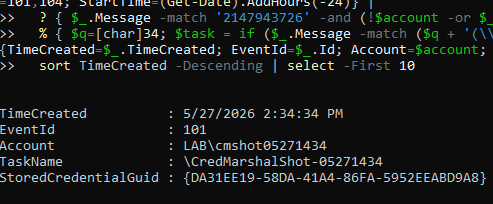
CredWom gives the account. It does not give the task name. The best source for the task name is the Task Scheduler Operational log. Event IDs 101 and 104 both record the task name and the run-as account when a task fails. The error value 2147943726 is the decimal HRESULT for ERROR_LOGON_FAILURE, which is what Task Scheduler logs for both stale-password failures and missing-vault-credential failures. Filtering on that value narrows the event set to tasks that could not authenticate.
Correlating on the account name from CredWom narrows it further to tasks associated with the specific broken credential. In a quiet environment that is usually one or two results. In a busy environment it is still a manageable set.
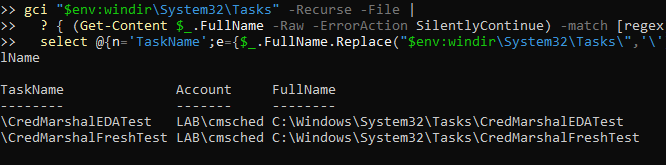
If the Task Scheduler Operational log has rolled over or was cleared, the fallback is searching task definition XML files under C:\Windows\System32\Tasks for the recovered run-as account. This does not tell you which task failed at the exact time, but it produces a shortlist of tasks that use that account and store a password, which is often enough to identify the culprit.
The ExtraHop Trigger
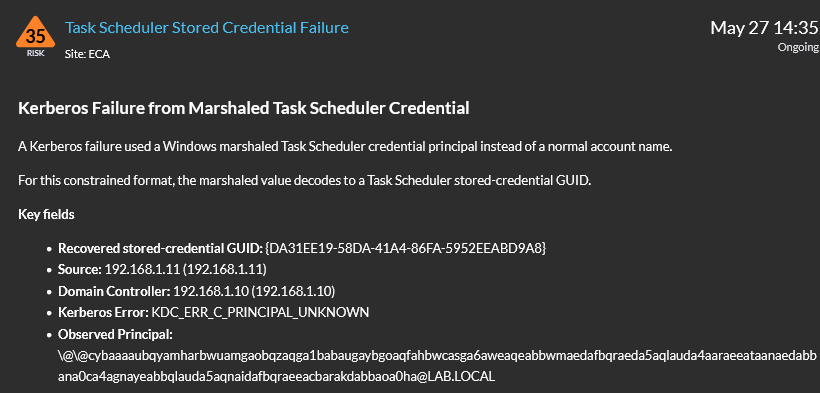
The trigger runs on KERBEROS_REQUEST and KERBEROS_RESPONSE events. The request side stashes the decoded GUID and principal on Flow.store. The response side reads them back, and only commits a detection if Kerberos.error is set. A successful authentication that happens to use this format does not generate a detection.
The identity key is sourceIdentity + "_taskguid_" + taskGuid with a one-week TTL. A broken scheduled task might generate one Kerberos failure per fifteen-minute retry cycle, or it might hammer the KDC much faster depending on the trigger interval. Either way, one ongoing detection per host per stored credential GUID keeps the noise manageable without losing the signal.
The detection card has two sections worth highlighting.
Detection Card Summary — the key fields rendered inside ExtraHop:
Detection Card Command — the endpoint pivot command, pre-populated with the recovered GUID:
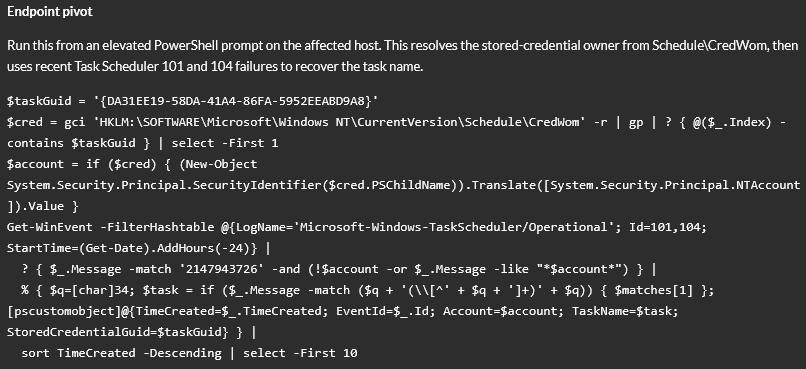
The command in the card is ready to paste into an elevated PowerShell prompt on the affected host. It resolves the run-as account from CredWom, queries Task Scheduler Operational logs for matching 101 and 104 events in the last 24 hours, and returns a table with the task name, account, event ID, and timestamp:
$taskGuid = '{DA31EE19-58DA-41A4-86FA-5952EEABD9A8}'
$cred = gci 'HKLM:\SOFTWARE\Microsoft\Windows NT\CurrentVersion\Schedule\CredWom' -r | gp | ? { @($_.Index) -contains $taskGuid } | select -First 1
$account = if ($cred) { (New-Object System.Security.Principal.SecurityIdentifier($cred.PSChildName)).Translate([System.Security.Principal.NTAccount]).Value }
Get-WinEvent -FilterHashtable @{LogName='Microsoft-Windows-TaskScheduler/Operational'; Id=101,104; StartTime=(Get-Date).AddHours(-24)} |
  ? { $_.Message -match '2147943726' -and (!$account -or $_.Message -like "*$account*") } |
  % { $q=[char]34; $task = if ($_.Message -match ($q + '(\\[^' + $q + ']+)' + $q)) { $matches[1] }; [pscustomobject]@{TimeCreated=$_.TimeCreated; EventId=$_.Id; Account=$account; TaskName=$task; StoredCredentialGuid=$taskGuid} } |
  sort TimeCreated -Descending | select -First 10
The $taskGuid value is pre-filled by the trigger from the decoded principal. The analyst does not need to copy the raw @@C string or do any manual decoding.
Remediation
Once the task name and account are confirmed, the fix is straightforward. The missing ingredient is a fresh credential file in the SYSTEM profile credential store. The most direct way to create it is to re-enter the stored password for the task.
Option 1: Task Scheduler GUI
Open Task Scheduler, locate the task, go to Properties, then the General tab. The “When running the task, use the following user account” field shows the configured account. Click “Change User or Group” and re-enter the account, then re-enter the password when prompted. This causes Windows to write a fresh credential file to C:\Windows\System32\config\systemprofile\AppData\Local\Microsoft\Credentials on the next task run or on save, depending on the OS version.
Option 2: schtasks
schtasks /Change /TN "\TaskName" /RU DOMAIN\account /RPThe /RP flag prompts for the new password. On Server 2019 and later you can supply it inline with /RP newpassword, but prompting is safer in a terminal that may be recorded or logged.
Option 3: PowerShell
$task = Get-ScheduledTask -TaskName 'YourTaskName'
$cred = Get-Credential -UserName 'DOMAIN\account' -Message 'Re-enter stored credential'
Set-ScheduledTask -InputObject $task -User $cred.UserName -Password $cred.GetNetworkCredential().Password
After updating via any of these methods, trigger the task manually to confirm a clean run:
Start-ScheduledTask -TaskName 'YourTaskName'Wait a few seconds and check the last run result:
(Get-ScheduledTask -TaskName 'YourTaskName').TaskPath
Get-ScheduledTaskInfo -TaskName 'YourTaskName' | Select-Object LastRunTime, LastTaskResult
LastTaskResult of 0 means success. Anything else means the task still cannot authenticate, and you should check whether the account name is still correct and whether SeBatchLogonRight is still granted to it via Local Security Policy.
Confirm the credential file has been recreated:
Get-ChildItem 'C:\Windows\System32\config\systemprofile\AppData\Local\Microsoft\Credentials' |
    Select-Object Name, LastWriteTime
A file with a recent LastWriteTime confirms Windows has written a fresh sealed copy. If the directory is still empty after a successful manual run, the task may be using “Do not store password” mode, which is a different configuration entirely and does not produce the @@C artefact.
Give the Task Scheduler retry interval (default 15 minutes) time to pass without generating new 4625 events. Confirm in the Security log that the marshaled principal is no longer appearing from that host. The ExtraHop detection will remain open for the identity TTL of one week, which is intentional: if the same GUID generates another failure within that window, it contributes to the same existing detection rather than creating a new one.
If the task is genuinely redundant and no longer needed, the clean fix is to delete it rather than refresh the credential. A deleted task cannot generate stale-credential failures.
What to Check if the Command Returns Nothing
No rows from the event log query: The Task Scheduler Operational log may not be enabled, may have rolled over, or the failure may have occurred outside the 24-hour window. Widen the StartTime:
Get-WinEvent -FilterHashtable @{
    LogName='Microsoft-Windows-TaskScheduler/Operational'
    Id=101,104
    StartTime=(Get-Date).AddDays(-7)
} | Where-Object { $_.Message -match '2147943726' } | Select-Object TimeCreated, Message | Format-List
If there are still no results, you can resort to the backup query that checks CredWom and the Tasks Folder under System 32.
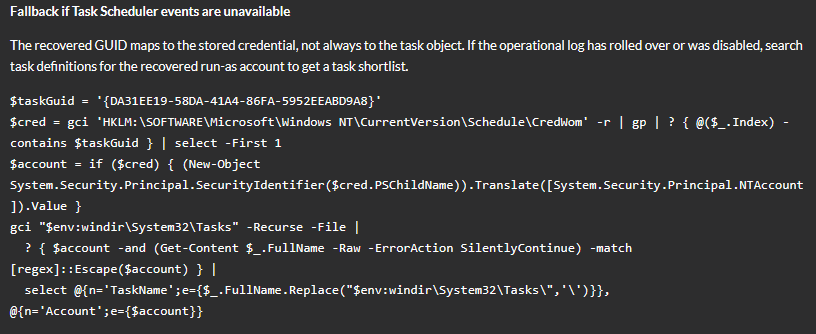
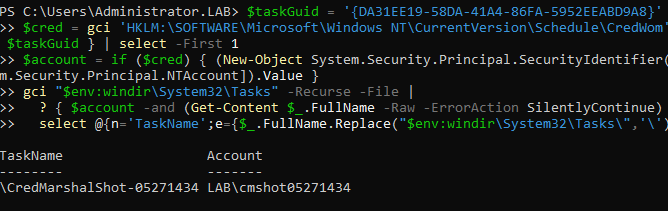
If $account is null after the CredWom query: The CredWom entry may have been cleaned up, or the decoded GUID may not yet have a matching entry if the task has never successfully run and written a vault entry. Fall back to searching task XML files:
$taskGuid = '{27714B00-FF11-40E6-8655-4487C784EBBE}'

$cred = gci 'HKLM:\SOFTWARE\Microsoft\Windows NT\CurrentVersion\Schedule\CredWom' -r |
    gp |
    Where-Object { @($_.Index) -contains $taskGuid } |
    Select-Object -First 1

$account = if ($cred) {
    (New-Object System.Security.Principal.SecurityIdentifier($cred.PSChildName)).
        Translate([System.Security.Principal.NTAccount]).Value
}

gci "$env:windir\System32\Tasks" -Recurse -File |
    Where-Object {
        $account -and
        (Get-Content $_.FullName -Raw -ErrorAction SilentlyContinue) -match [regex]::Escape($account)
    } |
    Select-Object @{n='TaskName'; e={$_.FullName.Replace("$env:windir\System32\Tasks\", '\')}},
                  @{n='Account'; e={$account}}
This searches every task definition XML for the recovered account name. It does not prove which task triggered the specific failure, but in most environments the account is used by a single task and the shortlist is one entry.
Why This Matters for Detection
The operational point from Part 1 was that a 4625 with a marshaled TargetUserName and SubStatus 0xC0000064 is not an attack. It is a broken scheduled task on a Credential Guard enabled host. The detection value is not a security alarm in the traditional sense, it’s more about AD Hygiene.
In an environment with hundreds of hosts and periodic re-imaging, tasks accumulating stale vault credentials is a real, recurring condition that often goes unnoticed until someone who relies on the task complains. Each one generates noise in Kerberos failure dashboards and in AD Invalid Credentials Bundle metrics. Surfacing them individually, with their GUID decoded and their remediation path pre-computed, is the difference between a mystery principal that an analyst adds to an exception list and a broken task that gets fixed.
Full Trigger Source
/**
 * Trigger: Kerberos Task Scheduler Marshaled Credential GUID
 * Events: KERBEROS_REQUEST, KERBEROS_RESPONSE
 * Purpose: Detect Kerberos failures where the client principal is a Windows
 *          CredMarshalCredentialW UsernameTargetCredential for the constrained
 *          TaskScheduler:Task:{GUID} format, and recover the task GUID.
 *
 * Assignment: Domain Controllers device group.
 *
 * Detection identity is source host + recovered task GUID, so a task that
 * generates 1 failure or 12,000 failures in a week still consolidates into
 * one ongoing detection for that host/task pair.
 */

if (event !== "KERBEROS_REQUEST" && event !== "KERBEROS_RESPONSE") return;

// ==========================================================================
// Request side: stash the task GUID candidate from the AS/TGS request.
// ==========================================================================

if (event === "KERBEROS_REQUEST") {
    var reqPrincipal = kerberosClientPrincipal();
    var reqGuid = recoverTaskSchedulerGuidFromMarshaledPrincipal(reqPrincipal);

    // Clear on non-matches so a later response on a reused flow cannot inherit
    // a stale GUID from an earlier request.
    Flow.store.marshaledTaskSchedulerGuid = reqGuid || null;
    Flow.store.marshaledTaskSchedulerPrincipal = reqGuid ? reqPrincipal : null;
    return;
}

// ==========================================================================
// Response side: only create detections for Kerberos failures.
// ==========================================================================

if (!Kerberos.error) return;

var principal = kerberosClientPrincipal();
var taskGuid = recoverTaskSchedulerGuidFromMarshaledPrincipal(principal);

if (!taskGuid && Flow.store.marshaledTaskSchedulerGuid) {
    taskGuid = Flow.store.marshaledTaskSchedulerGuid;
    principal = Flow.store.marshaledTaskSchedulerPrincipal || principal;
}

Flow.store.marshaledTaskSchedulerGuid = null;
Flow.store.marshaledTaskSchedulerPrincipal = null;

if (!taskGuid) return;

var clientIP = endpointIP(Flow.client);
var serverIP = endpointIP(Flow.server);
var sourceName = endpointName(Flow.client, clientIP);
var dcName = endpointName(Flow.server, serverIP);
var sourceIdentity = endpointIdentity(Flow.client, clientIP);
var desc = "### Kerberos Failure from Marshaled Task Scheduler Credential\n\n";
desc += "A Kerberos failure used a Windows marshaled Task Scheduler credential principal instead of a normal account name.\n\n";
desc += "For this constrained format, the marshaled value decodes to a Task Scheduler stored-credential GUID.\n\n";
desc += "**Key fields**\n\n";
desc += "* **Recovered stored-credential GUID:** `" + taskGuid + "`\n";
desc += "* **Source:** `" + sourceName + "` (`" + clientIP + "`)\n";
desc += "* **Domain Controller:** `" + dcName + "` (`" + serverIP + "`)\n";
desc += "* **Kerberos Error:** `" + Kerberos.error + "`\n";
if (principal) {
    desc += "* **Observed Principal:** `" + String(principal).substring(0, 500) + "`\n";
}
desc += "\n";
desc += "**Endpoint pivot**\n\n";
desc += "Run this from an elevated PowerShell prompt on the affected host. ";
desc += "This resolves the stored-credential owner from `Schedule\\CredWom`, then uses recent Task Scheduler `101` and `104` failures to recover the task name.\n\n";
desc += "```powershell\n";
desc += "$taskGuid = '" + taskGuid + "'\n";
desc += "$cred = gci 'HKLM:\\SOFTWARE\\Microsoft\\Windows NT\\CurrentVersion\\Schedule\\CredWom' -r | gp | ? { @($_.Index) -contains $taskGuid } | select -First 1\n";
desc += "$account = if ($cred) { (New-Object System.Security.Principal.SecurityIdentifier($cred.PSChildName)).Translate([System.Security.Principal.NTAccount]).Value }\n";
desc += "Get-WinEvent -FilterHashtable @{LogName='Microsoft-Windows-TaskScheduler/Operational'; Id=101,104; StartTime=(Get-Date).AddHours(-24)} |\n";
desc += "  ? { $_.Message -match '2147943726' -and (!$account -or $_.Message -like \"*$account*\") } |\n";
desc += "  % { $q=[char]34; $task = if ($_.Message -match ($q + '(\\\\[^' + $q + ']+)' + $q)) { $matches[1] }; [pscustomobject]@{TimeCreated=$_.TimeCreated; EventId=$_.Id; Account=$account; TaskName=$task; StoredCredentialGuid=$taskGuid} } |\n";
desc += "  sort TimeCreated -Descending | select -First 10\n";
desc += "```\n";
desc += "\n";
desc += "**Log correlation**\n\n";
desc += "The task name comes from `Microsoft-Windows-TaskScheduler/Operational` event `101` or `104` with `Error Value: 2147943726`. ";
desc += "If no rows are returned, widen the `StartTime` window or search those events around the detection timestamp.\n\n";
desc += "**Fallback if Task Scheduler events are unavailable**\n\n";
desc += "The recovered GUID maps to the stored credential, not always to the task object. ";
desc += "If the operational log has rolled over or was disabled, search task definitions for the recovered run-as account to get a task shortlist.\n\n";
desc += "```powershell\n";
desc += "$taskGuid = '" + taskGuid + "'\n";
desc += "$cred = gci 'HKLM:\\SOFTWARE\\Microsoft\\Windows NT\\CurrentVersion\\Schedule\\CredWom' -r | gp | ? { @($_.Index) -contains $taskGuid } | select -First 1\n";
desc += "$account = if ($cred) { (New-Object System.Security.Principal.SecurityIdentifier($cred.PSChildName)).Translate([System.Security.Principal.NTAccount]).Value }\n";
desc += "gci \"$env:windir\\System32\\Tasks\" -Recurse -File |\n";
desc += "  ? { $account -and (Get-Content $_.FullName -Raw -ErrorAction SilentlyContinue) -match [regex]::Escape($account) } |\n";
desc += "  select @{n='TaskName';e={$_.FullName.Replace(\"$env:windir\\System32\\Tasks\\\",'\\')}}, @{n='Account';e={$account}}\n";
desc += "```\n";

commitDetection("kerberos_task_scheduler_marshaled_credential", {
    title: "Task Scheduler Stored Credential Failure",
    description: desc,
    riskScore: 35,
    participants: [Flow.client.offender, Flow.server.victim],
    identityKey: sourceIdentity + "_taskguid_" + taskGuid,
    identityTtl: "week"
});

// ==========================================================================
// Helpers
// ==========================================================================

function kerberosClientPrincipal() {
    if (Kerberos.clientPrincipalName) {
        return String(Kerberos.clientPrincipalName);
    }

    if (!Kerberos.cNames || !Kerberos.cNames.length) return "";

    var parts = [];
    for (var i = 0; i < Kerberos.cNames.length; i++) {
        var part = String(Kerberos.cNames[i]).trim();
        if (part) parts.push(part);
    }
    if (!parts.length) return "";

    var principal = parts.join("/");
    if (principal.indexOf("@") === -1 && Kerberos.cRealm) {
        var realm = String(Kerberos.cRealm).trim();
        if (realm) principal += "@" + realm;
    }

    return principal;
}

function endpointIP(endpoint) {
    if (!endpoint || !endpoint.ipaddr) return "unknown";
    return endpoint.ipaddr.toString();
}

function endpointName(endpoint, fallback) {
    if (endpoint && endpoint.device) {
        if (endpoint.device.name) return endpoint.device.name;
        if (endpoint.device.hostname) return endpoint.device.hostname;
    }
    return fallback || "unknown";
}

function endpointIdentity(endpoint, fallback) {
    if (endpoint && endpoint.device) {
        if (endpoint.device.id) return "dev" + endpoint.device.id;
        if (endpoint.device.name) return endpoint.device.name;
        if (endpoint.device.hostname) return endpoint.device.hostname;
    }
    return fallback || "unknown";
}

function recoverTaskSchedulerGuidFromMarshaledPrincipal(value) {
    if (!value) return null;

    var s = String(value).toLowerCase().trim();

    // ExtraHop records can render escaped principal names as \@\@cy...
    s = s.replace(/\\@/g, "@");

    // Some renderers escape the value as \@@...
    if (s.charAt(0) === "\\") s = s.substring(1);

    // Strip realm suffix: @@cybaa...@REALM -> @@cybaa...
    // Do not treat the leading @@ as a realm delimiter.
    var at = s.lastIndexOf("@");
    if (at > 2) s = s.substring(0, at);

    var prefix = "@@cybaaaaubqyamharbwuamgaobqzaqga1babaugaybgoaqfahbwcasga6awea";
    if (s.length !== 161 || s.indexOf(prefix) !== 0) return null;

    var A = {
        ad:"0", ed:"1", id:"2", md:"3", qd:"4", ud:"5", yd:"6", cd:"7",
        gd:"8", kd:"9", ee:"A", ie:"B", me:"C", qe:"D", ue:"E", ye:"F"
    };
    var B = {
        wa:"0", xa:"1", ya:"2", za:"3", "0a":"4", "1a":"5", "2a":"6", "3a":"7",
        "4a":"8", "5a":"9", bb:"A", cb:"B", db:"C", eb:"D", fb:"E", gb:"F"
    };
    var C = {
        am:"0", qm:"1", gm:"2", wm:"3", an:"4", qn:"5", gn:"6", wn:"7",
        ao:"8", qo:"9", qq:"A", gq:"B", wq:"C", ar:"D", qr:"E", gr:"F"
    };
    var maps = { A:A, B:B, C:C };

    var spec = [
        [62,63,"A"], [65,66,"B"], [67,68,"C"], [70,71,"A"],
        [73,74,"B"], [75,76,"C"], [78,79,"A"], [81,82,"B"],
        [86,87,"A"], [89,90,"B"], [91,92,"C"], [94,95,"A"],
        [99,100,"C"], [102,103,"A"], [105,106,"B"], [107,108,"C"],
        [113,114,"B"], [115,116,"C"], [118,119,"A"], [121,122,"B"],
        [126,127,"A"], [129,130,"B"], [131,132,"C"], [134,135,"A"],
        [137,138,"B"], [139,140,"C"], [142,143,"A"], [145,146,"B"],
        [147,148,"C"], [150,151,"A"], [153,154,"B"], [155,156,"C"]
    ];

    var h = "";
    for (var i = 0; i < spec.length; i++) {
        var a = Number(spec[i][0]);
        var b = Number(spec[i][1]);
        var mapName = String(spec[i][2]);
        var token = s.charAt(a) + s.charAt(b);
        var nibble = maps[mapName][token];
        if (!nibble) return null;
        h += nibble;
    }

    return "{" +
        h.substring(0, 8) + "-" +
        h.substring(8, 12) + "-" +
        h.substring(12, 16) + "-" +
        h.substring(16, 20) + "-" +
        h.substring(20) +
        "}";
}