Credential Guard Ate My Username (@@CyBAAA and What It Means)
Table of Contents
Credential Guard Ate My Username (@@CyBAAA and What It Means)
I build security content bundles for ExtraHop as a senior security solutions architect. One of those is the AD Invalid Credentials Bundle, which aggregates Kerberos, SMB, and LDAP failure data across an environment and surfaces it as an analyst-friendly dashboard. The signal that kicked this off came from the Kerberos client principal unknown timeline, which tracks AS-REQ failures where the KDC doesn’t recognise the requested principal.
One of the principals appearing there looked like this:
@@CyBAAAAUbqyamharbwuamgaobqza...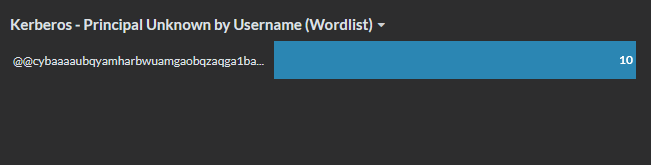
The first thing I noticed after confirming it wasn’t a display artefact was the interval: the client principal unknown errors were occurring from the same host every fifteen minutes. That cadence is Task Scheduler’s default retry interval, which immediately pointed at a scheduled task failing to authenticate, but I had absolutely no idea about why the client principal was so unusual.
Trying to decode the string directly went nowhere. CyberChef couldn’t make sense of it, and searching the web for the full string returned nothing useful. Searching for the partial prefix @@CyBAAA did return results though, scattered forum posts and ServerFault threads from people whose scheduled tasks were failing with exactly this kind of string appearing in their event logs. One of them also stated that they managed to resolve the issue by disabling Credential Guard. That confirmed the scheduled task angle but still didn’t explain what the string actually was.
Pivoting to the host’s Security and Task Scheduler Operational logs filled in the operational picture. Event ID 4625’s were there with the @@C TargetUserName, and alongside them were Task Scheduler Operational events that were much more readable. Event 101 named the task and the account it was meant to run as. Event 104 confirmed the failure point was LogonUserExEx. For the immediate work problem that was enough: a Credential Guard enabled host, a scheduled task with stored credentials, credential material that Windows could no longer resolve. The fix paths are well documented.
But I still wanted to know what the string actually was.
Finding the Lead
The @@ prefix was the thing that eventually cracked it open. A GitHub search for it in the context of Windows credentials surfaces a handful of projects around certificate and RDP smartcard credential marshalling. Awakecoding’s CertCredentialMarshaledString.ps1 gist shows the @@ prefix being produced for RDP smartcard credential selection. Yury Strozhevsky’s certMarshalCredentials project uses the same API family to create string representations of certificate credentials, including cases where Windows will attempt PKINIT if Kerberos is available.
Both of those pointed at CredMarshalCredentialW, a Windows API that converts a credential structure into a text string passable through APIs that expect a username parameter. The companion function CredUnmarshalCredentialW reverses the process. Strings produced by this API begin with @@.
The API supports several credential types. The relevant one here is USERNAME_TARGET_CREDENTIAL_INFO, credential type 2. Rather than passing an actual password, the caller passes a marshalled string that tells Windows to look up a matching stored credential from the vault and use that instead. The @@C string is a pointer into the credential store encoded as text, so it can travel through an API that expects a string.
That tied back to LogonUserExEx from the Task Scheduler 104 event. LogonUserExEx is an extended internal Windows API that accepts these marshalled strings in the username position, which is exactly how Task Scheduler passes stored vault credentials to LSA under Credential Guard. When the credential material can’t be resolved, the failure is recorded with the marshalled string sitting in the TargetUserName field because that’s what LSA received. The event log is recording the input correctly. The input just happens to be a credential reference rather than an account name.
It’s worth being explicit about what Credential Guard contributes here, because the missing credential file is the immediate trigger but the marshalled username only appears because Credential Guard is enabled. With Credential Guard off, Task Scheduler can pull the plaintext password out of the LSA secret store in the normal world and pass it straight to LogonUserExEx alongside the real account name; a failure in that path leaves the plaintext username in the 4625. With Credential Guard on, LSA is split between a normal world stub and an isolated process inside VTL1, and plaintext credentials can’t cross that boundary. Task Scheduler instead hands LSA a marshalled vault target as a reference, and the isolated LSA is expected to resolve that reference internally against the SYSTEM DPAPI-sealed credential file. When the file is missing, the resolution fails inside the isolated process and the marshalled token stays in the username field on the way back out, because that’s what crossed the boundary in the first place. So the file removal is the cause of the failure, but Credential Guard is the reason the failure shape is @@C rather than a plaintext name. That also explains why some of the forum threads I found suggested disabling Credential Guard as a fix: it doesn’t repair the broken task, it just routes the same failure through a code path that produces a more recognisable error.
Decoding the String
Confirming the theory meant actually decoding one of these strings. CredUnmarshalCredentialW does exactly that, so I wrote a small PowerShell wrapper that P/Invokes directly into advapi32.dll. The USERNAME_TARGET_CREDENTIAL_INFO structure has a single field: a pointer to a wide string. Decoding is a double dereference. ReadIntPtr reads the inner pointer from the returned struct, and PtrToStringUni materialises the actual username the credential targets.
param(
    [Parameter(Mandatory = $true)]
    [string]$Encoded
)

$sig = @'
using System;
using System.Runtime.InteropServices;

public static class CredMarshalParam
{
    [DllImport("advapi32.dll", CharSet = CharSet.Unicode, SetLastError = true)]
    public static extern bool CredUnmarshalCredentialW(
        string MarshaledCredential,
        out int CredType,
        out IntPtr Credential);

    [DllImport("advapi32.dll", SetLastError = true)]
    public static extern bool CredFree(IntPtr Buffer);
}
'@

Add-Type -TypeDefinition $sig

$credType = 0
$credPtr = [IntPtr]::Zero
$ok = [CredMarshalParam]::CredUnmarshalCredentialW($Encoded, [ref]$credType, [ref]$credPtr)
if (-not $ok) {
    $err = [Runtime.InteropServices.Marshal]::GetLastWin32Error()
    throw "CredUnmarshalCredentialW failed. Win32 error: $err"
}

try {
    $userNamePtr = [Runtime.InteropServices.Marshal]::ReadIntPtr($credPtr)
    $userName = [Runtime.InteropServices.Marshal]::PtrToStringUni($userNamePtr)
    $bytes = [Text.Encoding]::Unicode.GetBytes($userName)
    [pscustomobject]@{
        EncodedLength       = $Encoded.Length
        Header              = if ($Encoded.Length -ge 7) { $Encoded.Substring(0, 7) } else { $Encoded }
        CredType            = $credType
        UserNameLengthChars = $userName.Length
        UserNameLengthBytes = $bytes.Length
        UserName            = $userName
        CodeUnitsHex        = (($bytes | ForEach-Object { $_.ToString('X2') }) -join ' ')
        HighBytes           = (($bytes | ForEach-Object -Begin { $i = 0 } -Process {
                                    if (($i % 2) -eq 1) { $_.ToString('X2') }; $i++
                               }) -join ' ')
    }
} finally {
    [CredMarshalParam]::CredFree($credPtr) | Out-Null
}
Run that against a string I produced in the lab and the output was satisfying:
EncodedLength       : 161
Header              : @@CyBAA
CredType            : 2
UserNameLengthChars : 57
UserNameLengthBytes : 114
UserName            : TaskScheduler:Task:{D75856C4-8369-4268-8076-2FFED7654664}
CredType: 2 confirms this is a UsernameTargetCredential. The inner username is a Task Scheduler task reference in the format TaskScheduler:Task:{GUID}. Windows was not trying to authenticate a user named @@CyBAA.... It was attempting to resolve the stored vault credential for that specific scheduled task, and the lookup failed because the credential material was not there.

The production sample initially looked more complicated. Here is what the comparison showed:
                    Lab sample                          Production sample
EncodedLength       161                                 161
Header              @@CyBAA                             @@CyBAA
CredType            2                                   2
UserNameLengthChars 57                                  57
UserName            TaskScheduler:Task:{D75856C4...}    opaque high codepoint UTF-16
Same structure throughout, but where the lab sample decoded cleanly, the production inner value was garbage. I spent a while assuming this was a Credential Guard difference or a different encoding path on Server 2016. It wasn’t.
The production string came from ExtraHop, which sees it off the Kerberos wire. Kerberos normalises principal names to lowercase in transit. CredMarshalCredentialW is case-sensitive: the encoding is positional and the case of each character is load-bearing. Feeding the lowercased network version into CredUnmarshalCredentialW technically returns a result, but the inner bytes are meaningless because the input was corrupted by normalisation.
The host’s own 4625 event preserves the original mixed-case string, because it’s recorded at the LSA call boundary before Kerberos has touched anything. That is the version that decodes. The network capture version does not.
So the practical consequence is that you cannot decode an @@C string sourced from network data. For a decodable form, you need the string from the host’s Security log.
That said, the GUID is still recoverable from the lowercase network string, if you’re willing to assume the inner template is TaskScheduler:Task:{GUID}, which is a reasonable assumption given the context. The encoding is deterministic, so you can approach it as a constrained solve: marshal TaskScheduler:Task:{00000000-0000-0000-0000-000000000000} as a baseline, probe each of the 32 GUID hex digit positions by flipping it to F and recording which output characters change, then for each position try all 16 hex values against the target and keep the one that matches. The search space is small enough that the whole thing runs in a few seconds.
param(
    [Parameter(Mandatory = $true)]
    [string]$LowercasedMarshaledCredential
)

Set-StrictMode -Version 2.0
$ErrorActionPreference = 'Stop'

$sig = @'
using System;
using System.Runtime.InteropServices;

public static class CredMarshalRecover
{
    [DllImport("advapi32.dll", CharSet = CharSet.Unicode, SetLastError = true)]
    public static extern bool CredMarshalCredentialW(int CredType, IntPtr Credential, out IntPtr MarshaledCredential);

    [DllImport("advapi32.dll", SetLastError = true)]
    public static extern bool CredFree(IntPtr Buffer);
}
'@
Add-Type -TypeDefinition $sig -ErrorAction SilentlyContinue

function Marshal-UsernameTargetCredential {
    param([Parameter(Mandatory = $true)][string]$UserName)

    $strPtr = [Runtime.InteropServices.Marshal]::StringToHGlobalUni($UserName)
    $structPtr = [Runtime.InteropServices.Marshal]::AllocHGlobal([IntPtr]::Size)
    try {
        [Runtime.InteropServices.Marshal]::WriteIntPtr($structPtr, $strPtr)
        $outPtr = [IntPtr]::Zero
        $ok = [CredMarshalRecover]::CredMarshalCredentialW(2, $structPtr, [ref]$outPtr)
        if (-not $ok) {
            $err = [Runtime.InteropServices.Marshal]::GetLastWin32Error()
            throw "CredMarshalCredentialW failed. Win32 error: $err"
        }
        try {
            [Runtime.InteropServices.Marshal]::PtrToStringUni($outPtr)
        } finally {
            [CredMarshalRecover]::CredFree($outPtr) | Out-Null
        }
    } finally {
        [Runtime.InteropServices.Marshal]::FreeHGlobal($strPtr)
        [Runtime.InteropServices.Marshal]::FreeHGlobal($structPtr)
    }
}

$targetLower = $LowercasedMarshaledCredential.Trim()
if ($targetLower -match '@[^@]*$' -and $targetLower -like '@@c*@*') {
    $targetLower = ($targetLower -split '@[^@]*$')[0]
}
$targetLower = $targetLower.ToLowerInvariant()

$template = 'TaskScheduler:Task:{00000000-0000-0000-0000-000000000000}'
$baseLower = (Marshal-UsernameTargetCredential $template).ToLowerInvariant()
if ($baseLower.Length -ne $targetLower.Length) {
    throw "Length mismatch. Template marshals to $($baseLower.Length) characters, target is $($targetLower.Length)."
}

$guidPositions = @()
for ($i = 0; $i -lt $template.Length; $i++) {
    if ($template[$i] -eq '0') {
        $guidPositions += $i
    }
}

$effects = @{}
$allAffected = New-Object 'System.Collections.Generic.HashSet[int]'
foreach ($pos in $guidPositions) {
    $chars = $template.ToCharArray()
    $chars[$pos] = 'F'
    $mutated = (Marshal-UsernameTargetCredential (-join $chars)).ToLowerInvariant()
    $diff = @()
    for ($j = 0; $j -lt $mutated.Length; $j++) {
        if ($mutated[$j] -ne $baseLower[$j]) {
            $diff += $j
            [void]$allAffected.Add($j)
        }
    }
    $effects[$pos] = $diff
}

$badFixed = @()
for ($j = 0; $j -lt $targetLower.Length; $j++) {
    if ((-not $allAffected.Contains($j)) -and $targetLower[$j] -ne $baseLower[$j]) {
        $badFixed += $j
    }
}
if ($badFixed.Count -gt 0) {
    throw "Target is not compatible with TaskScheduler:Task:{GUID}; fixed positions differ: $($badFixed -join ',')"
}

$hex = '0123456789ABCDEF'.ToCharArray()
$solutions = [ordered]@{}
foreach ($pos in $guidPositions) {
    $candidates = @()
    foreach ($h in $hex) {
        $chars = $template.ToCharArray()
        $chars[$pos] = $h
        $mutated = (Marshal-UsernameTargetCredential (-join $chars)).ToLowerInvariant()
        $ok = $true
        foreach ($j in $effects[$pos]) {
            if ($mutated[$j] -ne $targetLower[$j]) {
                $ok = $false
                break
            }
        }
        if ($ok) {
            $candidates += [string]$h
        }
    }
    $solutions[[string]$pos] = $candidates
}

$zero = @($solutions.GetEnumerator() | Where-Object { @($_.Value).Count -eq 0 }).Count
$multi = @($solutions.GetEnumerator() | Where-Object { @($_.Value).Count -gt 1 }).Count

$candidateChars = $template.ToCharArray()
foreach ($kv in $solutions.GetEnumerator()) {
    $values = @($kv.Value)
    $candidateChars[[int]$kv.Key] = if ($values.Count -eq 1) { [char]$values[0] } else { '?' }
}
$candidate = -join $candidateChars
$marshaled = Marshal-UsernameTargetCredential $candidate

[pscustomobject]@{
    CandidateUserName = $candidate
    CandidateMarshaled = $marshaled
    LowercaseMatch = ($marshaled.ToLowerInvariant() -eq $targetLower)
    AmbiguousPositions = $multi
    UnsolvedPositions = $zero
    Template = $template
}
Running it against the production sample:
.\Recover-LowercaseTaskSchedulerGuid.ps1 -LowercasedMarshaledCredential '@@cybaaaaUBQYAmharbwuamgaobqza...'Against the production sample, this recovered the GUID cleanly:
CandidateUserName   : TaskScheduler:Task:{4854D8FB-FCAE-4699-A8E1-0E5BC5C60140}
CandidateMarshaled  : @@CyBAAAAUBQYAMHArBwUAMGAoBQZA...
LowercaseMatch      : True
AmbiguousPositions  : 0
UnsolvedPositions   : 0
Zero ambiguous positions means every hex digit in the GUID had exactly one solution. The recovered marshalled string lowercases to match the input exactly.
To cross-reference the recovered GUID against tasks on the host, the quickest approach is SharpDPAPI’s system triage, which shows the TargetName field of each SYSTEM credential file directly (as seen earlier in this post). Alternatively, you can list which scheduled tasks on the host use stored passwords, which are the only ones that can produce this artefact:
Get-ScheduledTask |
    Where-Object { $_.Principal.LogonType -eq 'Password' } |
    Select-Object TaskPath, TaskName, @{N='User'; E={ $_.Principal.UserId }}
In practice, if the host’s Task Scheduler Operational log is intact, event 101 gives you the task name directly and the GUID recovery is unnecessary. Where it becomes useful is if you only have the network telemetry and the host events are unavailable. In that case the constrained solve is the only path to the GUID without access to the host.
Reproducing the Artefact
I wanted to reproduce this in a controlled lab to capture the full event context in real time. The environment was a Windows 11 Enterprise machine joined to a small AD domain, with Credential Guard running. I confirmed the Credential Guard status via Win32_DeviceGuard before any testing to make sure the conditions matched production.
The setup steps:
- Create a dedicated low privilege domain user,
cmsched, to own the test task. - Grant
cmschedtheSeBatchLogonRightlocal security policy right. Windows requires this for LogonType 4 batch logons. Missing it produces a completely different failure, which comes up later. - Register a password backed scheduled task running as
cmsched. The action itself is trivial (cmd.exe /c exit 0). The important part is that the task stores the password rather than using the “do not store password” option. - Trigger the task and confirm it runs successfully. A clean first run causes Windows to write a fresh credential file into the SYSTEM profile credential store:
C:\Windows\System32\config\systemprofile\AppData\Local\Microsoft\CredentialsThis file is how Task Scheduler keeps the sealed copy of the stored password between runs. When the task fires, Task Scheduler passes a marshalled vault target to LSA. LSA uses DPAPI to unseal the credential file and recover the password. The logon proceeds normally.
SharpDPAPI can triage the SYSTEM credential store without needing to decrypt anything, showing the vault metadata in plaintext:
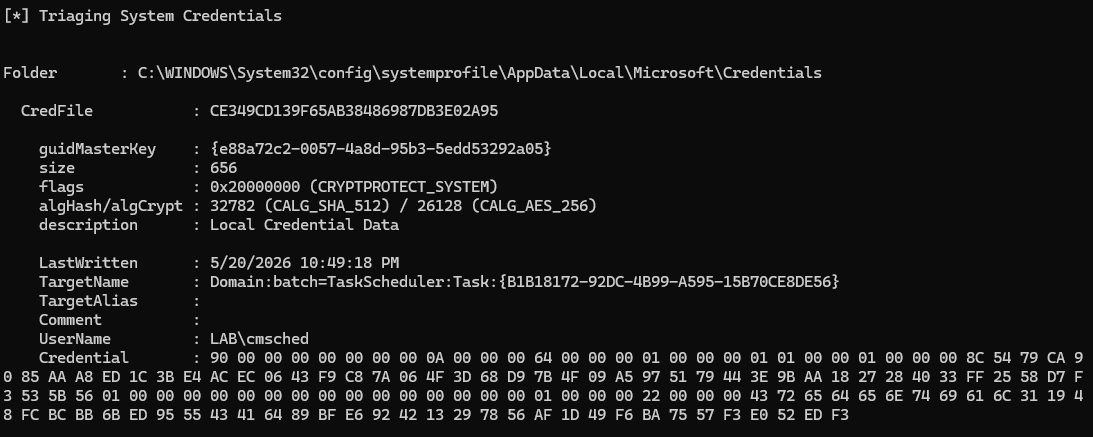
The TargetName field is the vault entry key: Domain:batch=TaskScheduler:Task:{GUID}. That’s what Task Scheduler uses to look up the right credential when the task fires. Notice it’s slightly different from the inner username the decoder produced (TaskScheduler:Task:{GUID}, without the Domain:batch= prefix). The vault target name and the marshalled credential string are related but not identical. The CRYPTPROTECT_SYSTEM flag on the credential tells you it’s sealed with the machine’s DPAPI key rather than a user key, which is why moving the file off the host or restoring it to a different machine won’t help.
- As SYSTEM, move that fresh credential file out of the Credentials directory. Don’t delete it, relocate it so the directory is empty. The task still exists. The task still knows it should run as
cmsched. But the vault entry that Task Scheduler needs is gone. - Reboot the machine. This clears LSA’s cached credential state and forces Task Scheduler to go back to the credential store on the next launch.
- Trigger the task again.
After reboot, with the credential file absent, this appeared in the Security log:
Event ID:               4625
Account Name:           @@CyBAAAAUBQYAMHArBwUAMGAoBQZA...
Account Domain:         -
Logon Type:             4
Status:                 0xC000006D
Sub Status:             0xC0000064
Logon Process:          Advapi
Authentication Package: Negotiate
Caller Process:         C:\Windows\System32\svchost.exe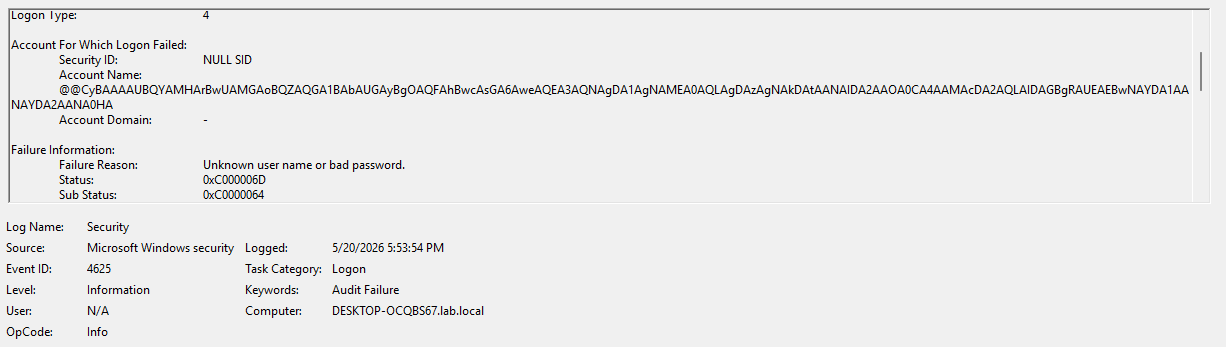
That is the ghost username.
Worth being precise about what the trigger actually was: the @@C artefact appeared specifically because the credential material became unavailable to LSA after the task had already been registered and proven to work. A stale password, a missing logon right, or a Credential Guard toggle all produce different failure shapes, which the next section covers.
What Did Not Trigger It
I ran a number of variations expecting to see the same marshalled string and didn’t, and those negatives are worth knowing.
Changing the AD password behind the task’s back. Register the task successfully, then reset cmsched’s password in AD without updating the stored task credential. The resulting failure stays entirely normal:
Account Name:   cmsched
Account Domain: LAB
Status:         0xC000006D
SubStatus:      0xC000006A
SubStatus 0xC000006A is wrong password. The username remained cmsched. Task Scheduler still found the vault entry and used it. The credential just didn’t match any more. No marshalled string.
Toggling Credential Guard off and back on between credential storage and task fire. Still produced plaintext cmsched failures with the stale password SubStatus. The vault entry survived the toggle.
Placing cmsched in the Protected Users group. Same result: plaintext name, stale password SubStatus when the password was wrong.
Missing local batch logon rights. This produced a different failure entirely:
Account Name:   cmsched
Status:         0xC000015B
0xC000015B is logon type not granted. Different code, still a plaintext name.
Condition                        TargetUserName     SubStatus
Normal stale task password       cmsched            0xC000006A
Missing SeBatchLogonRight        cmsched            0xC000015B
Missing vault credential file    @@CyBAA...         0xC0000064
The marshalled username was not a generic Task Scheduler failure shape. It appeared only when Task Scheduler attempted to use a vault credential that LSA could not locate or unseal. Every other failure mode left the real account name in the event.
Around the reproduced failure, three Task Scheduler Operational events appeared in immediate succession:
TaskScheduler Operational, Event ID 110
  Task Scheduler launched \CredMarshalMovedCredFile for user cmsched.

TaskScheduler Operational, Event ID 101
  Task Scheduler failed to start \CredMarshalMovedCredFile for user LAB\cmsched.
  Error Value: 2147943726

TaskScheduler Operational, Event ID 104
  Task Scheduler failed to log on \CredMarshalMovedCredFile.
  Failure occurred in LogonUserExEx.
  Error Value: 2147943726
Event 110 tells you the task name. Events 101 and 104 tell you the task name, the real account name and the error code. The Security 4625 tells you what LSA was actually handed: the marshalled vault target. Together these two sources make the failure fully readable. Task Scheduler tried to log on LAB\cmsched, passed a marshalled vault token to LogonUserExEx, LSA couldn’t find the credential material to match it, and Windows recorded that token as the failed TargetUserName because that is what it was given.
Without the Operational log, the Security event is unresolvable. With it, the whole thing becomes a straightforward broken vault credential story.
The error value 2147943726 is worth noting. It is the HRESULT form of Win32 error 1326, ERROR_LOGON_FAILURE, the classic incorrect username or password return code. That same value appeared in the Task Scheduler Operational log for both the stale password case and the missing credential file case. The Task Scheduler event alone does not tell you which type of failure you have. The Security SubStatus does:
Stale task password (vault found, password wrong):  0xC000006A
Missing vault credential file (vault not found):    0xC0000064
I swept the surrounding event window across System, Application, LSA Operational, DPAPI Operational, Kerberos Operational, CAPI2 and Winlogon during the reproduction. DPAPI Operational produced event 12289 (“DPAPI found credential key”) naming the machine account. LSA Operational produced event 303 (“The security package does not cache the user’s sign on credentials”) also naming the machine account. Both were useful context but neither explained the failure as directly as Task Scheduler 101 and 104 already did. Kerberos Operational and CAPI2 had nothing in the tight reproduction window, which makes sense: the failure happened before LSA got far enough to attempt a Kerberos ticket request.
Detection
Obviously, if you use Extrahop it will show up in various dashboards and metrics if you actually monitor AD Hygiene as a failed principal.
Correlate within a few seconds on the same host to Task Scheduler Operational 101 or 104 with Error Value: 2147943726. That correlation surfaces the real account name and the real task name. Without it, the Security event tells you the credential type but not the task.
That pairing is also what separates this from alert fatigue. An @@C 4625 appearing every fifteen minutes is Task Scheduler retrying a broken stored credential. Correlating to the Operational log turns a mysterious recurring alert into a concrete broken task with a named account, which is something an analyst or an ops team can actually act on.
Broader, lower priority:
Any 4625 where TargetUserName begins @@C, regardless of LogonType or process name. Windows does not restrict CredMarshalCredentialW to Task Scheduler. That was just the path I could reproduce reliably. Other Windows components or third party applications could theoretically produce the same artefact through the same API family. I haven’t observed it from other sources in the wild, but I wouldn’t rule it out.
For the AD Invalid Credentials Bundle specifically: if a principal unknown event contains an @@C TargetUserName, don’t attempt to resolve it as an AD object. Treat it as a marshalled credential artefact and pivot immediately to the host’s Task Scheduler Operational log for the real account and task context.
Why This Matters
I like this finding because it lives in a genuinely obscure corner of Windows behaviour, but it follows logically from the documentation once you know where to look. Nothing here is undocumented.
Windows has a whole class of fields in authentication calls that can carry structures rather than literal names. Marshalled vault targets are one example. Certificate hashes encoded for RDP smartcard selection are another. The @@C prefix is the tell that you’re looking at something from this family rather than an AD principal, and the SubStatus is what tells you which failure type you have.
The case sensitivity issue is also worth keeping in mind as a broader principle. The string you see in network telemetry and the string recorded in the host’s Security log are the same credential artefact, but they are not the same bytes. Kerberos normalisation strips the case information that makes the encoding decodable. If your detection pipeline ingests from both sources, the two representations of the same event will look different enough that naive string matching won’t correlate them. The host log is authoritative for decoding; the network log is where you’ll see it first.
For defenders, a 4625 with a marshalled TargetUserName and SubStatus 0xC0000064 is not an attack. It is a broken scheduled task on a Credential Guard enabled host. The credential material the task was registered with has become unavailable to LSA, which happens when vault entries are deleted or moved, when a machine is re-imaged with tasks carried over, or when Credential Guard is enabled on a host that already had tasks registered with locally stored passwords. Knowing that quickly, and knowing which task and which account is involved, is most of the work.